
Short answer
A Live Photo from the iPhone camera covers about 1.5 seconds before and 1.5 seconds after you press the shutter, so roughly three seconds. Photos can only trim that shorter. To get a longer Live Photo, make one from a video with an app: in Beavery it lasts as long as the stretch you select.
A Live Photo from the iPhone camera lasts about three seconds: Apple says it records 1.5 seconds before and 1.5 seconds after you take the picture. Photos can only trim that shorter. Apple publishes no maximum length, so for a longer Live Photo, make one from a video with an app such as Beavery.
That three seconds is how the Camera app captures a Live Photo, not a published limit of the format. Below: what Photos can and can’t change, how to make a longer one, and what is still unconfirmed.
How long a camera Live Photo is
When Live is on in the Camera app, pressing the shutter saves the moments around the photo, with sound, not just the instant itself. Apple’s Live Photos page puts it plainly: your iPhone “records what happens 1.5 seconds before and after you take a picture.” Together that’s roughly three seconds of motion and sound, with the key photo in the middle.
You can’t set a longer capture in Camera settings. If you want more than that, you’ll have to start from a video.
Can Photos make a Live Photo longer?
No. The editing tools in Photos all work inside the frames that were recorded:
- Trim. In Edit, you can drag either end of the frame viewer to choose the frames the Live Photo plays. That makes it shorter, never longer.
- Loop and Bounce. These effects repeat the same frames, either in a loop or back and forth. They play for longer, but they don’t add anything that wasn’t captured.
- Save as Video. Open the Live Photo, tap More and choose Save as Video. You get the Live Photo’s movie as a regular video, at the same length.
So a camera Live Photo can’t gain extra seconds afterwards, in Photos or in any other app. The frames simply aren’t there.
How to make a longer Live Photo from a video
If you filmed the moment as a video, you can turn any stretch of it into a Live Photo of the length you want. Here’s how it works in Beavery:
- Open the video in Beavery and choose LIVE under the preview.
- Drag the start and end handles on the film strip. Under the strip, Beavery shows the start time, end time and length of your selection, so you can see exactly how long the Live Photo will be. There’s no maximum; drag the end as far as you want.
- Move the Cover marker to the frame you want as the still. It can be any frame of the video.
- Tap Export Now (or Add to Batch to make more from the same video) and save to Photos (batch export needs Pro; your first one is free).
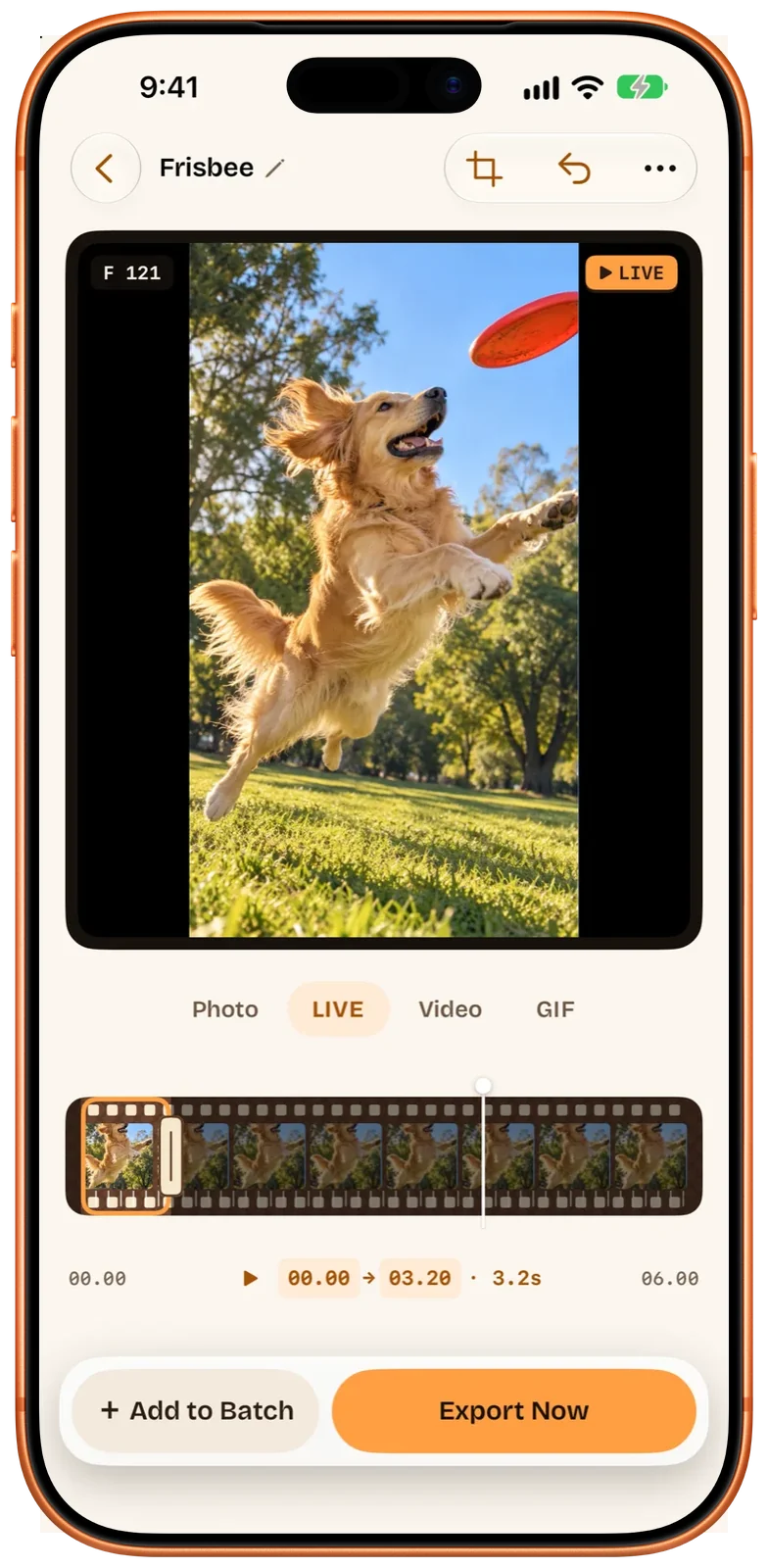
By default Beavery copies the selected stretch without re-encoding, so the Live Photo keeps the video’s sound, HDR, resolution and frame rate. The step-by-step guide to turning a video into a Live Photo covers the cover frame, sound and date options in more detail.
If you’d rather automate it, Beavery’s Save as Live Photo action in the Shortcuts app takes a start time and a duration of 1 to 60 seconds. Making Live Photos with Shortcuts and the Share Sheet shows how to set that up.
Will Photos play a long Live Photo?
This is the honest part. Apple doesn’t document how long a Live Photo can be, and Beavery doesn’t promise any particular length will play in full everywhere.
What Beavery does is check every Live Photo with Photos’ own loader before saving it. If Photos won’t accept one, Beavery tells you and offers Save as Video Instead, so you don’t end up with a broken item in your library. Whether very long Live Photos then play all the way through when you press and hold hasn’t been confirmed.
A few practical points:
- File size grows with length. A longer Live Photo is a bigger file. Beavery shows an estimated size for each result before you export, and you can choose a lower quality, 30 fps or 1080p to make it smaller.
- Sharing. Apple notes that when a device or service doesn’t support Live Photos, the Live Photo is sent as a still. A long moment you mainly want to send may work better as a video; why a Live Photo stops moving after sending goes through each channel.
- Make several instead. If the video has more than one good moment, you can make several Live Photos from one video and export them together. Making many Live Photos from one video explains how.
Live Photo lengths at a glance
| Where the Live Photo comes from | How long it can be |
|---|---|
| iPhone Camera | About 1.5 seconds before and 1.5 seconds after the shutter (Apple) |
| Trimmed in Photos | Only shorter than what was recorded |
| Made from a video in Beavery | The stretch you select; the app sets no maximum |
| Beavery’s Shortcuts actions | 1 to 60 seconds |
| Made from a still photo in Beavery | About three seconds of still or gentle zoom motion (1 to 3 seconds through Shortcuts) |
| A GIF made in Beavery (for comparison) | Up to 20 seconds |
Going the other way: a long Live Photo as a video
To share a long Live Photo with someone whose app shows only stills, save it as a video. Photos’ Save as Video works for any Live Photo. Beavery can also make a video (MOV or MP4) from a Live Photo, with its sound, and lets you pick which part of its movie to keep. Saving a Live Photo as a video covers both ways.
Beavery processes your videos on the device. They aren’t uploaded. It’s one app for iPhone, iPad and Mac; Beavery for Mac works the same way with keyboard frame stepping.
Questions
How long is a Live Photo on iPhone?
Apple says the camera records what happens 1.5 seconds before and 1.5 seconds after you take the picture, so a camera Live Photo covers roughly three seconds.
Can I make a Live Photo longer than 3 seconds?
Not with the Camera or Photos app, which can only trim a Live Photo shorter. Making a Live Photo from a video with an app such as Beavery lets you choose a longer stretch.
Is there a maximum length for a Live Photo?
Apple doesn't publish one. Beavery sets no maximum when you drag the selection, and its Shortcuts actions accept 1 to 60 seconds. Whether very long Live Photos play in full in Photos hasn't been confirmed.
How do I make a long Live Photo a smaller file?
In Beavery each result shows an estimated size before you export. For a Live Photo you can lower the quality to High or Compact, set 30 fps or 1080p, or simply select a shorter stretch.
Can I add more seconds to a Live Photo I already took?
No. A Live Photo only contains the frames the camera recorded, so no app can add time that wasn't captured. If you also filmed a video of the moment, you can make a longer Live Photo from that video.
How this guide was checked
- Checked against
- Beavery 1.0 · Apple Support documentation
- Device test
- The steps in this guide have not yet been run one by one on a device.
- Checked
Sources. Apple Support: Take and edit Live Photos; Apple Support: Edit Live Photos on iPhone; Apple Support: How to turn a Live Photo into a video on your iPhone
Written by the maker of Beavery. We sell the app described here; the limits above are the same ones you will hit.